Free vs Pro: what the money actually buys
Most free editors put the thing you actually need behind the paywall — the watermark, the resolution, the export itself. ProCut's split is different and easy to state: the whole editor is free, all of the AI is free because it runs on your own device, and Pro pays for the one thing that costs somebody money — licensed content — plus the quiet of an app with no ads.
In short
- Free covers the whole editor: timeline, cutting, transitions, speed curves, keyframes, text, audio and 4K export with no watermark.
- Pro is $4.99/month or $34.99/year; a Lifetime unlock is $69.99 once.
- Every AI feature is free on every tier — captions, background separation, beat detection — because they all run on your device. There are no credits and no server AI.
- Pro adds the eight Pro colour looks and the premium asset packs, and turns off the one ad.
- Premium content is also reachable on Free by watching an ad — no paywall, just a slower door.
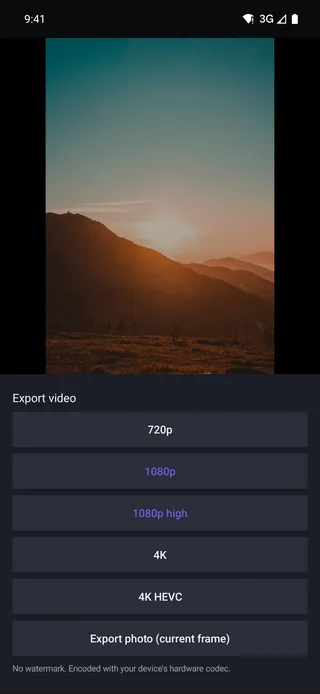
The whole split, in one table
| Capability | Free — $0 | Pro — $4.99/mo · $34.99/yr | Lifetime — $69.99 |
|---|---|---|---|
| Multi-track timeline, cutting, transform | Yes | Yes | Yes |
| All core transitions | Yes | Yes | Yes |
| Speed curves, reverse, freeze frame | Yes | Yes | Yes |
| Keyframe animation | Yes | Yes | Yes |
| Text, titles, audio mixing | Yes | Yes | Yes |
| Export to 4K, no watermark | Yes | Yes | Yes |
| On-device AI, as each feature ships | Yes | Yes | Yes |
| Automatic captions, on your device | Yes | Yes | Yes |
| The eight Pro colour looks | Watch an ad, 24 hours | Yes | Yes |
| Premium fonts, stickers and templates | Watch an ad | Yes | Yes |
| No ads anywhere in the app | — | Yes | Yes |
US list prices. Store prices vary by country and currency.
What free really includes
Read the first seven rows again, because they are the unusual part. On the free tier you get:
- The full multi-track timeline with no lane limit.
- Every core transition, with real overlap and automatic audio cross-fades.
- Speed curves, reverse and freeze frame.
- Keyframe animation on every animatable property.
- Text and titles and full audio mixing.
- Export up to 4K HEVC, with no watermark and no resolution cap.
There is no export limit, no project count limit, and no account to create in order to use any of it.
What Pro adds
Two things, and that really is the whole list.
- Licensed content. The eight Pro colour looks — Teal & Orange, Moody, Neon, Vintage and the rest — plus the premium fonts, stickers and templates. These are licensed from their creators, and that licence is not free. On the free tier you can still unlock them by watching an ad, which pays for the same licence a different way.
- No ads. On a paid tier the ad SDK is never started at all.
Note what is not on the Pro list: the timeline, the transitions, the export resolution, the watermark. The tools are not the product being sold.
Why the AI is free
Because it runs on your phone. Automatic captions are transcribed by the device's own speech engine; background separation, beat detection and Ken Burns motion are computed from media that is already sitting in local storage. None of it touches a server of ours, so none of it costs us anything per use — and a feature that costs nothing to serve has no honest reason to be metered.
So there are no credits to buy, no monthly allowance to run down, and no balance to watch. We do not sell server AI at all. That is the same principle behind everything else being on-device: if your footage never leaves the phone, there is no bill to pass on and nothing of yours for us to hold.
Which one you actually need
- Stay on Free if you edit your own footage with your own music and export to 4K. That is most people, and nothing about the result is compromised — the free export file is byte-for-byte what a paying user gets.
- Take Pro if you want the eight Pro colour looks and the premium asset packs without watching an ad for them, or you simply want no ads at all. At $34.99 a year it is $2.92 a month.
- Take Lifetime at $69.99 if you know you want that permanently and prefer one payment to a subscription. Nothing renews and there is nothing to top up.
The ad option, and what it is for
The row that surprises people is Watch an ad against premium filters, fonts, stickers and music. It exists because those assets are licensed from the people who made them, and a licence has to be paid for one way or another.
So there are two doors to the same room. A subscription pays the licence with money; an ad pays it with attention. Neither is a trick, and the free door is not a worse version of the content — it is the same asset.
What is worth noticing is what is not behind either door: the timeline, the cutting tools, the transitions, the keyframes, the export resolution and the absence of a watermark. Those are not licensed from anyone, so there is nothing to recover.
The questions people actually ask
| Question | Answer |
|---|---|
| Can I export 4K on the free tier? | Yes, up to 4K HEVC, with no watermark |
| Is there an export limit? | No — no daily cap, no project count limit |
| Do I need an account to use the free tier? | No account at all, on any tier |
| Does Pro unlock better quality? | No. Export quality is identical on every tier |
| Do any AI features cost extra? | No — they run on your device, free on every tier |
| Does Pro remove the ads? | Yes, and the ad SDK is never even started |
If a feature you care about is in the first seven rows of the comparison table, you do not need to pay anything. That is the intended reading of it, not an oversight.
Frequently asked questions
Is 4K export really free?
Yes — up to 4K HEVC, with no watermark and no resolution cap, on the free tier. Export quality is not what Pro sells.
Do any AI features cost extra?
No. Every AI feature in ProCut runs on your own device, so it is free on every tier with no usage limit. There are no credits to buy and no server doing the work.
Can I get premium content without subscribing?
Yes. On the free tier, premium filters, effects, transitions, fonts, stickers and music can be unlocked by watching an ad.
The editor is the free part.
Timeline, transitions, keyframes and 4K export with no watermark — at $0, with no account.
Keep reading
Export presets and 4K HEVC
720p, 1080p, 1080p high, 4K and 4K HEVC — plus a photo export of the current frame, all through your device's hardware codec.
Offline editing and privacy
Editing runs entirely on your device. There is no sign-up, no cloud processing of your footage, and aeroplane mode changes nothing.
One project, every device
Native apps on every platform, one JSON project schema, and golden-frame tests that keep the three engines honest.