No account, no upload, no watermark
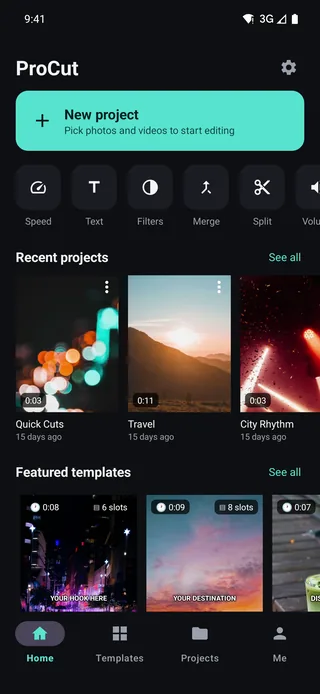
Open most free editors and the first screen asks for an email. The second uploads your footage to somebody's server. ProCut does neither: you open the app and you are editing, and the video never leaves the device unless you share it yourself.
In short
- No account. No email, no phone number, no sign-in wall — open the app and edit.
- Nothing is uploaded. Decoding, compositing and encoding all run on your device's own hardware.
- Full functionality offline. Aeroplane mode, a plane, a basement — the editor does not care.
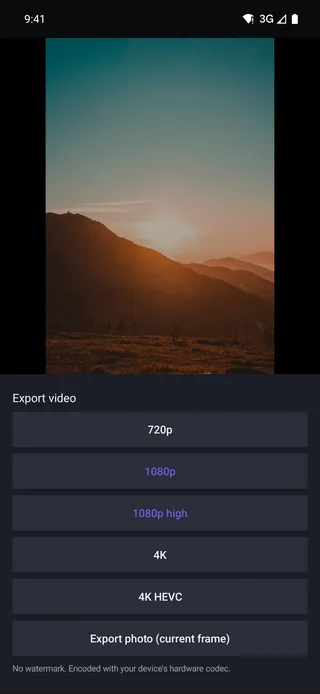
- No watermark on exports, on any plan.
Why there is no account
Accounts exist in editing apps for a small number of reasons: to sync projects, to gate features, to run cloud processing, and to build a marketing list. ProCut does not need the first three, and is not interested in the fourth.
What that removes from your day:
- No email or phone number to hand over.
- No password to forget or reset.
- No sign-in wall between you and a two-minute edit.
- No account to be included in someone else's data breach.
What “on-device” actually means
Every stage of editing runs on hardware you own:
| Stage | Where it happens | What that means |
|---|---|---|
| Decoding | Your device's hardware decoder | Footage is read locally, never transmitted |
| Preview and compositing | Your GPU | Effects render on the device you are holding |
| Encoding | Your device's hardware encoder | The export file is created locally |
| Project files | Local storage | A JSON project alongside your media |
There is no processing step that requires a round trip to a server, which is also why export speed depends on your device rather than on someone's queue.
The offline test
The simplest way to verify any of this yourself: turn on aeroplane mode and use the app. Import, cut, grade, add text, generate speech with an installed voice, and export at 4K. All of it works, at full speed, with the radio off.
A useful habit regardless of which app you use: try it in aeroplane mode. Anything that stops working without a connection was sending something somewhere.
Who this matters most to
- Anyone filming family. Children's faces are not something to hand to a processing pipeline in exchange for a free filter.
- Journalists and researchers working with material that should not exist on a third party's storage.
- Businesses under confidentiality obligations — product footage, internal training, anything under NDA.
- Anyone on a metered connection. Uploading and re-downloading 4K footage is expensive in both time and data.
- Anyone editing where there is no signal — planes, trains, mountains, basements.
Where the network does come in
To be straight rather than absolutist: three things use the network, and none of them is your footage. Buying or restoring a purchase goes through the store. The one reward video you tap yourself is fetched when you tap it. And the first time you ask for captions in a language, the device downloads that language pack once — a file coming down, with nothing of yours going up. Editing itself — cutting, speed, colour, text, audio, transitions, stickers, templates, captions, export — never touches the network at all. The AI included: it all runs on your own chip, which is why none of it costs anything.
Where your projects live
A project is a small JSON document describing your timeline — which clips, which cuts, which effect values — stored locally next to the proxies and thumbnails ProCut generated during import. Your source media stays wherever it already was, untouched.
The same JSON schema is used by every platform's build, which is what makes moving a project between devices possible without a cloud account sitting in the middle.
The permissions it asks for, and why
An app that edits video needs access to media. What it does not need is everything else, and a short permission list is one of the more reliable signals about how an app is funded.
| Permission | Why it is needed | When it is asked for |
|---|---|---|
| Add to Photos (iPhone, iPad) | To write one finished export into your library | Only when you tap Save Video on the share sheet after an export |
| Speech recognition (iPhone, iPad) | To turn the speech in your own clips into caption text, on the device | Only when you start auto-captions |
| Storage (Android 7–9) | To copy a finished export into the Gallery, where uninstalling will not lose it | Only when you save an export, and only on those releases — Android 10 and later ask nothing |
Importing media asks for nothing at all: the system photo picker runs outside the app and hands back only the clips you tapped. There is no camera row and no microphone row because ProCut records neither. Nothing here touches contacts, location, or a background network permission.
What “free” usually costs elsewhere
It is worth being concrete about the alternatives, because “free video editor” describes several very different business models.
- Watermark-funded. Free to use, but the export carries a logo until you subscribe. The tool works; the output is branded.
- Resolution-capped. Free at 720p, with 1080p or 4K behind the paywall — the free tier exists mainly as a demonstration.
- Cloud-processed. Your footage is uploaded so effects can run on someone's servers. Fast to build, and it means your material exists somewhere other than your device.
- Data-funded. Free, with an account, and the account is the product.
ProCut's answer is the fourth column: the editor is free because the editor is not what is being sold. What money buys is licensed content and cloud GPU time, and both are described plainly in the pricing post.
How to check any editor's claims yourself
Every video editor says it respects your privacy. These four checks take about five minutes and do not require taking anyone's word for it, ProCut included.
- Turn on airplane mode and edit. If cutting, trimming, colour and export all still work, the editing is genuinely local. If a feature stalls, it was going somewhere.
- Read the permission list in your system settings, not the store page. Anything beyond media access on a video editor deserves a question.
- Export and check the file. Does it carry a watermark? Is it the resolution you chose? Both are visible in seconds.
- Look for the account wall. Not at install — at export. Some apps let you edit freely and only ask who you are when you want the result.
Applied to ProCut, the answers are: everything works offline, including the AI; the permission list is the table above, and on a current Android phone it is empty; exports carry no watermark at any tier; and there is no account wall because there are no accounts.
Frequently asked questions
Does ProCut require an account or sign-up?
No. There is no account, no email and no sign-in wall — the app opens straight into a new project.
Is my footage uploaded anywhere?
No. Decoding, compositing and encoding all run on your device. The optional AI features are the only network-dependent part, and they are opt-in per use.
Does the app work with no internet connection?
Yes. Every core editing and export feature works fully offline — you can verify it in aeroplane mode.
Your footage stays yours.
No account, no upload, no watermark — full editing and 4K export with the radio switched off.
Keep reading
Export presets and 4K HEVC
720p, 1080p, 1080p high, 4K and 4K HEVC — plus a photo export of the current frame, all through your device's hardware codec.
Free vs Pro, and what Pro unlocks
The whole editor is free, including 4K export with no watermark. Pro pays for licensed content and for cloud GPU time.
One project, every device
Native apps on every platform, one JSON project schema, and golden-frame tests that keep the three engines honest.