Pro video editing on every screen you own.
ProCut is a native multi-track editor built once for Android, iPhone, iPad, macOS and Windows — the same timeline, the same transitions, the same exported frames. Cutting happens on your device, not on someone else's server.
No watermark, ever No account required Editing works offline No ads while you edit
The core is free, forever
Trim, split, speed, transitions, text, audio and export — all free, with no watermark burned into your video and no sign-up wall in front of it. Pro adds eight extra colour looks and turns the ads off. That is all it adds, and it never gates an editing tool.
Your footage stays on your device
Decoding, compositing and export run through your device's own hardware codecs. Nothing is uploaded, there is no server doing the work for you, and the whole app keeps running in airplane mode.
One project, five platforms
Android, iPhone, iPad, macOS and Windows each run a native engine against one shared timeline model, verified frame-by-frame against the same golden numbers. A project opened on another device looks the same.
Recorded on a real phone
Twenty-seven seconds, one take, nothing sped up.
A screen recording from a Pixel 10 Pro XL: open a project, play a four-lane timeline, switch colour looks with live preview, open the export sheet. No cuts, no mockups, no “results may vary”.
-
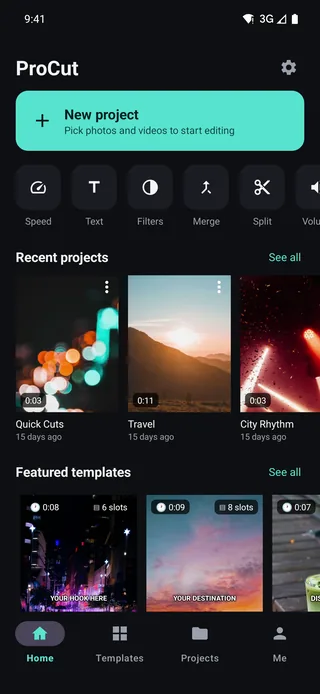
Home, then straight into a project Recent projects and one-tap tools — no onboarding, no account wall.
-
Four lanes playing at once Video with thumbnails and waveform, a picture-in-picture overlay, a music track and a text clip — composited live on the GPU.
-
Colour looks, previewed on your own frame B&W, Cool and Warm swapped one after another. Each thumbnail is the current frame, not a stock swatch.
-
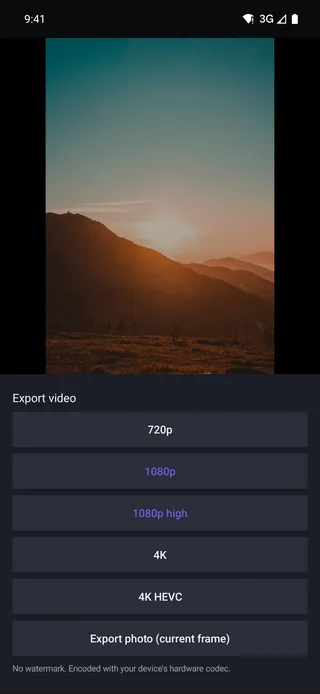
Export up to 4K HEVC Hardware-encoded on the phone. No watermark on any tier, including the free one.
Every screen below is a real screenshot
Nothing here is a render.
Same build you can download today, on a phone we own. Swipe to see the timeline, speed curves, transitions, colour and export.
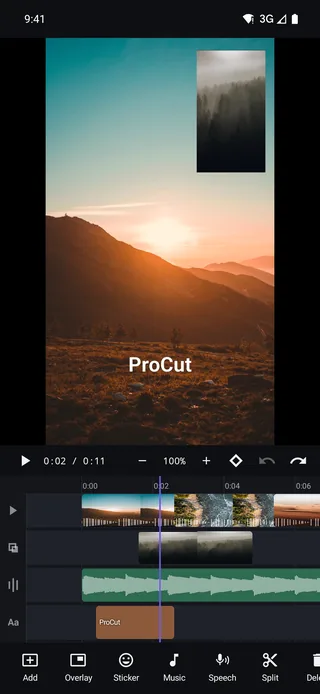
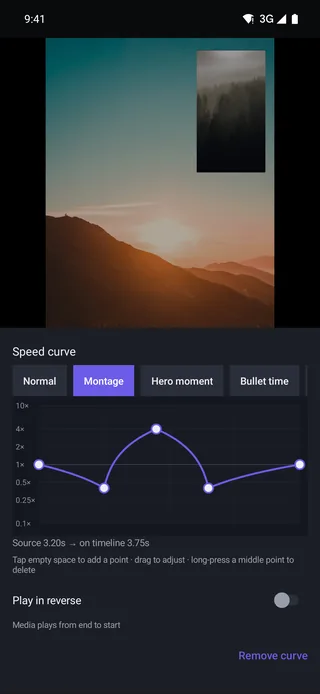
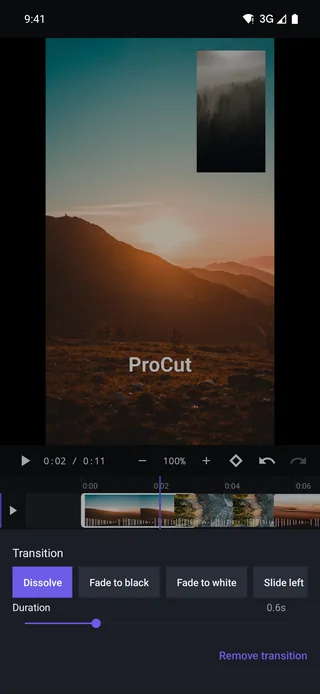
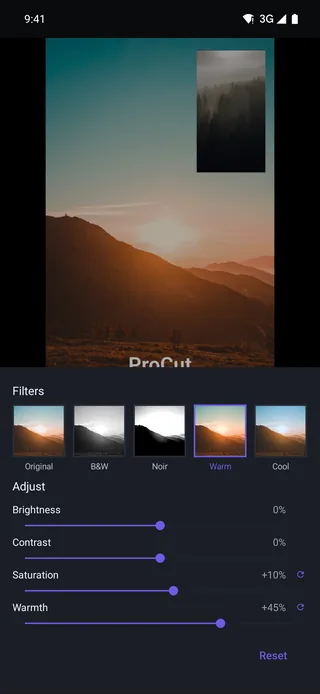
A real timeline, not a template filler.
Everything below ships in version 1.0 and is verified by automated tests that export real files on real hardware — not just unit tests over a data model.
Multi-track timeline
Video, audio, text and overlay lanes with pinch zoom, magnetic snapping, haptic feedback, thumbnail strips and live audio waveforms.
Precise cutting
Split, trim, ripple delete, duplicate and reorder on a magnetic main track — frame-accurate, with unlimited undo and redo.
Speed & speed curves
Constant speed from 0.25× to 4×, bezier speed ramps, reverse and freeze frame. Pitch lock is on by default, so slow motion doesn't sound drunk.
Real transitions
Dissolve, fade to black or white, slide, zoom, wipe and blur swap — rendered by the GPU with true clip overlap, not a cheap opacity fade.
Keyframes
Animate position, scale, rotation, opacity and volume with easing. Splitting a clip keeps its animation intact instead of resetting it.
Text & titles
Type size is measured against the project frame, so a title looks identical on a 720p draft and a 4K export — and on every platform.
Audio you can hear
Background music, per-clip volume, fade in and out, and automatic cross-fades that ride along with every visual transition.
Fast on modest phones
Imports build a 960p proxy so scrubbing stays smooth, while the export always goes back to your original full-resolution source.
Clean export
H.264 MP4 up to 4K through your device's hardware encoder. What the preview shows is what the file contains — same code path for both.
Native everywhere. No web view in sight.
Each app is written in its platform's own language against its own media stack — Kotlin and media3 on Android, Swift and AVFoundation on Apple, C# and Media Foundation on Windows.
| Platform | Minimum version | Built with | Status |
|---|---|---|---|
| Android phone & tablet | Android 7.0 (API 24) | Kotlin · AndroidX media3 | v1.0 |
| iPhone | iOS 15.0 | Swift · AVFoundation | v1.0 |
| iPad | iPadOS 15.0 | Swift · AVFoundation | v1.0 |
| Mac | macOS 12 Monterey | Swift · Mac Catalyst | v1.0 |
| Windows PC | Windows 11 | C# · WinUI 3 · .NET 9 | In development |
The scissors are free. Always.
Every editing tool is free, and so is every AI feature — they all run on your own device, so they cost us nothing to give away. Pro sells you eight extra colour looks and a quiet app with no ads. Nothing else.
No account, no watermark, no trial clock.
- Full multi-track timeline
- All core transitions and text
- Speed curves, reverse, keyframes
- Export up to 4K, no watermark
- On-device AI free as it ships (see roadmap)
- Auto captions, written on your device
- The eight Pro colour looks
- An ad-free app
That is $2.92 a month, 42% off — or pay $4.99 monthly with no commitment. The yearly plan starts with 7 days free.
- Everything in Free
- All eight Pro colour looks — Teal & Orange, Moody, Neon, Vintage and the rest
- No ads anywhere in the app
- Email support
- Cancel any time in your store account
One payment. No renewal, ever.
- Every Pro feature, permanently
- Buy on iPhone, works on Mac too
- Email support
- Nothing to renew, nothing to top up
Prices above are the United States list price. The App Store and Google Play set the equivalent price for every other country — in Vietnam that is 119.000₫ monthly, 799.000₫ yearly and 1.690.000₫ lifetime. Your local price, including tax, is always shown by the store before you confirm. Subscriptions renew automatically until you cancel, which you do in your Apple or Google account rather than through us; the Terms of Service spell that out.
Being built next.
Listed here rather than in the feature grid on purpose: these are not in version 1.0 yet, and we would rather under-promise on a store listing.
Filters & LUTs
Colour grading with .cube LUT import and per-clip adjust controls.
Masks & chroma key
Shape masks, blend modes and green-screen removal with edge refinement.
Picture-in-picture
Free-floating overlay clips with transform keyframes and blend modes.
On-device captions
Automatic speech-to-text and styled subtitles, generated locally and free.
Templates
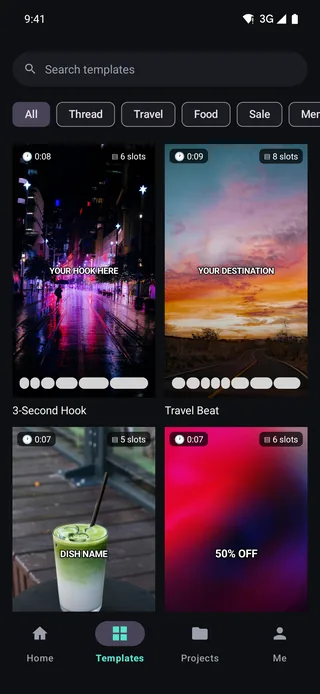
One-tap edits that drop your clips into a ready-made rhythm.
Windows release
The WinUI 3 desktop app, sharing the same project format as mobile.
Straight answers.
Does ProCut put a watermark on my video?
No. Exports are clean on every plan, including the free one. There is no "remove watermark" upgrade because there is no watermark.
Do I need an account?
No. You can install ProCut, edit and export without creating an account or giving us an email address. There is no account to create — nothing in the app talks to a server of ours.
Are my videos uploaded anywhere?
No — not for anything. Import, preview, effects, captions and export all run locally through your device's own hardware, and the whole app works with the network switched off. There is no exception and no opt-in cloud mode: we never receive your footage, so we could not upload it if we wanted to. Details are in the Privacy Policy.
Which formats can I import and export?
Import covers whatever your device's decoder supports — in practice H.264, HEVC, and common photo formats. Export is H.264 in an MP4 container, up to 4K and 60 fps depending on your hardware.
Can I open the same project on my phone and my Mac?
The project format is identical across platforms and is read and written by all of them, so a project file copied between devices opens correctly. Automatic cloud sync is on the roadmap, not in 1.0.
How much is Pro, and what does it actually unlock?
$4.99 a month, $34.99 a year, or $69.99 once for lifetime. It unlocks the eight Pro colour looks and turns off the ads. That is the whole list. It does not unlock any editing tool — every tool in the timeline, and every AI feature, is free on every plan. See the full breakdown.
Do any AI features cost extra?
No. Every AI feature in ProCut — auto captions, background separation, beat detection — runs on your own chip, so it costs us nothing and costs you nothing, with no usage limit and no balance to top up. We do not sell credits and there is no server doing AI work for you.
How do I cancel a subscription?
Through the store you bought it from — Subscriptions in your Apple account settings, or Payments & subscriptions in Google Play. We cannot cancel it for you, but support can walk you through it.
Is there a version for Windows?
It is being built. The shared editing core already runs and is tested on Windows; the desktop interface around it is not finished, so we have not shipped it.
Start cutting. Nothing to sign up for.
Free core, no watermark, no account — install it and open a project.