Export: five presets, no watermark, on any plan
Export is where most free editors present the bill: a logo in the corner, a resolution cap, or a nag screen. ProCut's export sheet is five presets, a photo option, and one line of small print — no watermark, encoded with your device's hardware codec.
In short
- Five video presets: 720p, 1080p, 1080p high, 4K and 4K HEVC, plus Export photo for the current frame.
- No watermark on any plan. The free tier exports clean files.
- Encoding runs on your device's hardware codec, so a long timeline does not mean an hour of waiting.
- HEVC gives roughly the same quality at a much smaller file — with a compatibility trade-off worth knowing about.
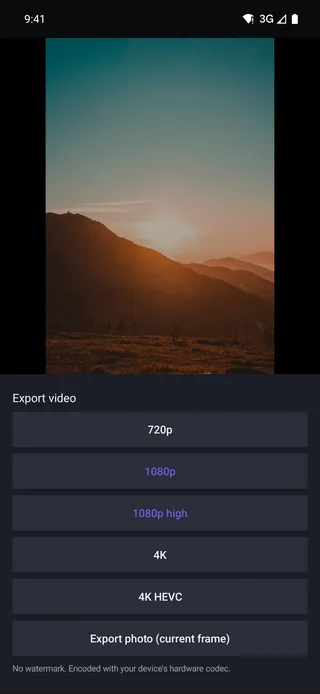
The export sheet
Tap Export and you get a list, not a wizard. Each row is a preset; underneath them sits Export photo (current frame); underneath that, the footnote: No watermark. Encoded with your device's hardware codec.
Which preset to pick
| Preset | Resolution | Codec | Pick it for |
|---|---|---|---|
| 720p | 1280×720 | H.264 | Messaging, email, tight storage, quick drafts |
| 1080p | 1920×1080 | H.264 | The default — everywhere, on everything |
| 1080p high | 1920×1080 | H.264, higher bitrate | Detail-heavy footage: motion, foliage, gradients |
| 4K | 3840×2160 | H.264 | Archive, big screens, footage you will re-edit |
| 4K HEVC | 3840×2160 | H.265 | 4K at a much smaller file size |
Vertical projects export at the matching vertical dimensions — the numbers above are the landscape equivalents.
If you are unsure, pick 1080p. Every platform accepts it, it plays on everything, it uploads quickly, and social platforms re-encode aggressively enough that a 4K master often arrives looking no better than a good 1080p one.
Choose 1080p high when the footage has a lot of fine detail or fast motion — rain, leaves, crowds, sport. The extra bitrate goes exactly where compression artefacts would otherwise appear.
HEVC versus H.264
| H.264 | HEVC (H.265) | |
|---|---|---|
| File size at equal quality | Baseline | Roughly half |
| Compatibility | Plays on essentially everything | Modern devices and browsers; older ones may refuse |
| Encode speed on device | Very fast | Fast on recent hardware |
| Best for | Sharing, uploading, sending to anyone | Storage, archiving, 4K you keep |
The short version: HEVC to keep, H.264 to send. A 4K HEVC file is excellent on your own drive and a support request waiting to happen when you message it to a relative with an eight-year-old laptop.
What hardware encoding buys you
Every phone, tablet and computer ProCut runs on has a dedicated video encoding block in silicon. ProCut uses it through each platform's native stack — media3 and MediaCodec on Android, AVFoundation on Apple hardware, Media Foundation on Windows — rather than encoding in software.
Three consequences you notice:
- Speed. Export is typically a fraction of the timeline's duration, not a multiple of it.
- Battery and heat. A dedicated encoder uses far less power than pushing the same work through the CPU.
- Consistency. The same file comes out whether you exported from the phone or the tablet.
Export takes longer when the timeline is complex, not when it is long. Stacked overlays, several graded layers and lots of transitions all add compositing work before the encoder ever sees a frame.
Export photo
The last row grabs the frame under the playhead as a still image at full project resolution. Useful for a thumbnail, a social post that accompanies the video, or simply pulling one good frame out of a clip — including a frame from the middle of a speed ramp, where no such photo ever existed on the camera roll.
What each destination actually wants
| Destination | Preset | Why |
|---|---|---|
| Short-form vertical video | 1080p | Platforms re-encode heavily; 4K wins you nothing |
| YouTube, long-form | 4K or 1080p high | The platform keeps more of a higher-quality master |
| Messaging apps | 720p | Small file, fast send, they compress anyway |
| Client delivery or archive | 4K HEVC | Best quality per byte for something you keep |
| Re-editing later | 4K | Widest compatibility as source footage |
About that watermark line
It is worth being explicit, because so many apps in this category are not: ProCut does not burn a watermark into any export on any plan, and there is no resolution cap behind a subscription. The free tier gives you clean 4K files. What Pro changes is covered in the pricing post — and it is not this.
Resolution is not the only thing that matters
People treat resolution as the quality dial, but for most footage the bitrate does more visible work. Resolution is how many pixels there are; bitrate is how much information each second of video is allowed to keep.
That is exactly the gap 1080p high exists to fill. It has the same pixel count as 1080p and simply spends more data on it. Where that shows:
- Fine repeating detail — leaves, grass, hair, brickwork. These are the first things a low bitrate turns to mush.
- Fast motion — sport, handheld pans, anything where most of the frame changes at once.
- Smooth gradients — skies and studio backdrops, where too little data produces visible banding.
- Grain and noise — low-light footage costs a lot of bitrate to encode faithfully.
Conversely, a locked-off shot of someone talking against a plain wall looks essentially identical at 1080p and 1080p high. Spend the bitrate where the picture is busy.
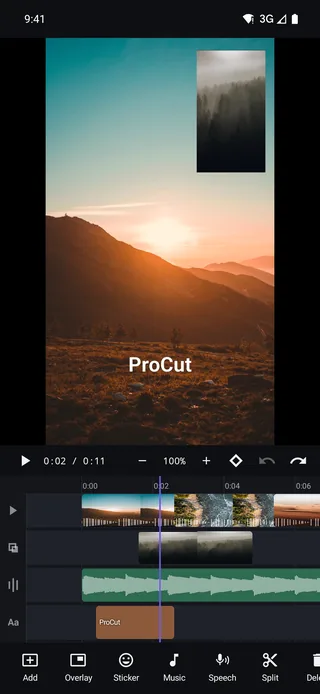
A four-point check before you export
- Watch it once, all the way through, without touching anything. Every export you regret is one you did not watch first.
- Check the last frame. Stray black frames and half-second tails at the end of a timeline are the most common export defect there is.
- Check the audio on a speaker, not headphones. See the mixing guide for why.
- Check text against the safe area for wherever you are posting — the rules are in the text guide.
Then pick the preset, and let the hardware encoder do its job.
Frequently asked questions
Does the free version of ProCut add a watermark?
No. Exports are clean on every plan, at every resolution, including 4K.
Should I export in HEVC?
Choose HEVC when you are keeping or archiving a 4K file — it is roughly half the size at similar quality. Choose H.264 when you are sending the file to someone else, because it plays on older devices too.
Why did my export take longer than the video is long?
Complexity, not length. Stacked overlays, multiple graded layers and many transitions all require compositing work before frames reach the hardware encoder.
Clean files, at any resolution.
720p to 4K HEVC, hardware-encoded, and never a watermark — including on the free tier.
Keep reading
Proxy editing and performance
Imports build a 960p proxy for the timeline while export reads your original file — the reason a five-year-old phone can cut 4K footage.
Free vs Pro, and what Pro unlocks
The whole editor is free, including 4K export with no watermark. Pro pays for licensed content and for cloud GPU time.
Filters and colour adjustment
Six looks, four adjustment sliders, and the discipline that turns mismatched footage into something that reads as a single piece.