Audio: the half of video people actually notice
Viewers forgive a soft shot. They do not forgive audio that clips, jumps or buries a voice under a music bed. ProCut treats sound as a first-class part of the timeline — its own lanes, its own waveforms, its own volume automation — because that is where most of the perceived quality lives.
In short
- Audio sits on independent lanes — music, voice and extracted sound can all run at once, unaffected by picture edits.
- Waveforms are drawn from decoded audio, so you can see the beat, the silence and the word you want to cut on.
- Per-clip volume, fade in and fade out, plus keyframed volume for manual ducking under a voice.
- Music should sit around 15–25% under speech — most amateur mixes are simply too loud on the music track.
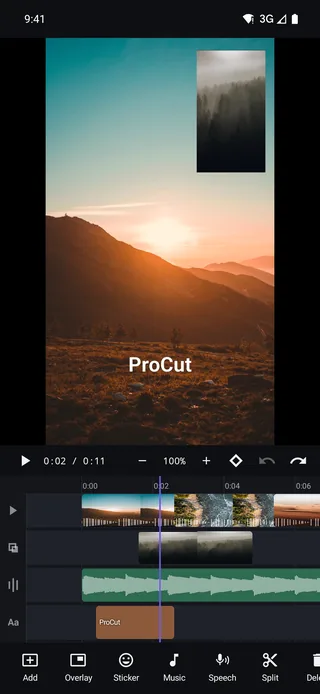
Independent audio lanes
Audio lanes are free, not magnetic. Trim a video clip and your music does not move — which is exactly right, because a soundtrack is timed to itself, not to your cuts.
What that lets you build:
- Music running unbroken under a sequence of a dozen cuts.
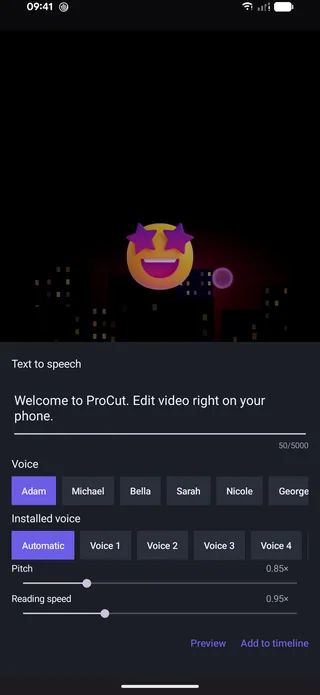
- Voiceover on a second lane, added with text to speech or recorded.
- Original sound from a clip, kept or muted per clip.
- Extracted audio — detach a clip's sound so it can be re-timed, faded or kept running over a cutaway.
Keeping the original sound quietly present under music is a small trick with a large effect: ambient noise from the location is what makes a video feel like it was filmed somewhere rather than assembled.
Reading the waveform
The green lane in the screenshot is a real waveform, generated during import alongside the editing proxy. Three things it tells you at a glance:
| What you see | What it means | What to do |
|---|---|---|
| Tall regular spikes | Beat or transient | Put your cut here |
| A flat stretch | Silence or room tone | Trim it out, or use it to breathe |
| A solid wall with no shape | Clipped or over-compressed audio | Lower the source, or replace it |
| A slow swell | A build or a pad | Good place to start a title or a transition |
Volume, fades and ducking
Every audio-bearing clip has its own volume control, plus fade-in and fade-out lengths. Three habits worth adopting permanently:
- Always fade music in and out. Even 0.3 seconds. A track that starts at full level on frame one sounds like a mistake; one that ends abruptly sounds like a crash.
- Duck under speech. Use volume keyframes: full level, drop to around 20% just before the first word, back up after the last one. Four keyframes, and it is the single biggest upgrade available to most edits.
- Let transitions handle their own cross-fades. Every visual transition already generates a matching audio cross-fade, so joins do not click.
Mix on the device people will watch on. A mix balanced in headphones frequently has music far too loud when it comes out of a phone speaker — and most viewers are on a phone speaker.
Levels that actually work
| Situation | Speech | Music |
|---|---|---|
| Talking to camera | 100% | 15–20% |
| Voiceover over b-roll | 100% | 20–25% |
| Music-led montage, no speech | — | 80–100% |
| Intro or outro with no dialogue | — | 60–80% |
| Ambient sound kept under music | — | 10–15% original clip audio |
Percentages are a starting point — trust the check below over the numbers.
The check: play the video at a normal listening level and try to make out every word while doing something else. If you find yourself concentrating, the music is too loud.
Cutting to the beat
An edit cut to music feels intentional even when the footage is ordinary. The waveform makes it mechanical rather than mystical:
- Put the music down first, before any picture edits.
- Zoom in until individual beats are visibly separated in the waveform.
- Park the playhead on a beat and split there.
- Trim each clip so its most interesting moment lands on the following beat.
Cut on the beat for energy; cut a few frames before it when you want the edit to feel like it is leading rather than following.
Four fixes for bad phone audio
- Wind. Nothing rescues it in post. Mute the clip and replace it with music, or use text to speech for the narration.
- Uneven levels between takes. Set each clip's volume individually so the loudest and quietest sit close together, rather than pushing one master level.
- Room echo. Lower the original audio, bring music up slightly, and keep the voice clips short. Echo is most obvious in long unbroken passages.
- A pop or bump at a join. Add a short fade at that clip's edge, or let a transition's automatic cross-fade cover it.
A mixing order that works every time
Mixing goes wrong when it is done in the wrong order — people balance music against a voice, then change the voice, then rebalance, forever. Work in passes instead.
- Speech first, alone. Mute everything else and set each speech clip so the quiet takes and the loud takes sit close together. That becomes the reference everything else is judged against.
- Then original sound. Bring the location audio back at a low level — 10 to 15% is often enough. It should be felt rather than heard.
- Then music. Raise the track until it is present but you never strain for a word.
- Then automation. Duck the music under each speech block, and put a fade on the head and tail of every audio clip.
- Finally, one listen on a phone speaker without touching anything. Note what bothers you, then fix only those things.
Detaching audio, and why you would
Extracting a clip's sound onto its own lane separates picture timing from audio timing, which is what makes several standard techniques possible.
| Technique | What you do | Effect |
|---|---|---|
| J-cut | The next scene's audio starts before its picture | The cut arrives softly instead of as a surprise |
| L-cut | The outgoing audio continues over the next picture | Keeps a speaker's thought intact across a cutaway |
| Cutaway with continuous sound | Detach, then cut picture freely above it | Interviews stay audible while you show b-roll |
| Re-timed ambience | Detach, then slide or stretch the sound | Location noise stops jumping at every cut |
The J-cut is the most useful thing on that list. It is a large part of why professional edits feel like they flow: the sound of the next scene has already begun, so the picture cut is not an event.
Frequently asked questions
Can I keep a clip's original sound and add music at the same time?
Yes. The original audio stays with the clip and music goes on its own lane; set each level independently, or extract the original audio to re-time it.
Are the waveforms real or approximated?
Real. They are drawn from the decoded audio track during import, which is why you can use them to find beats and silences precisely.
Does ProCut have automatic ducking?
Ducking is done by hand with volume keyframes, which gives you exact control over when the dip starts and ends — usually a beat before the first word.
Sound like you meant it.
Independent audio lanes, real waveforms, per-clip volume, fades and keyframed ducking — free, on every platform.
Keep reading
Text to speech voiceover
Six named voices plus your device's installed voices, pitch and reading speed controls, preview before you commit, then straight onto the audio lane.
Keyframes and Ken Burns moves
Scale, position, rotation, opacity and volume can all animate. Set two points, and the engine interpolates every frame in between.
Transitions with real overlap
Dissolve, fade, slide, zoom, wipe and blur swap — with true clip overlap and an audio cross-fade that rides along automatically.