Slow motion, reverse and freeze frame
Not every speed change needs a curve. Three simple operations cover most of what people actually want — make it slower, run it backwards, stop it dead — and each has one detail that decides whether the result looks deliberate or broken.
In short
- Constant speed runs 0.25× to 4× per clip, and the timeline immediately shows the new length.
- Pitch lock is on by default — slowed voices stay in their own register instead of sounding drunk.
- Reverse plays the media end to start, audio included, and composes with a speed curve.
- Freeze turns the current frame into a real segment you can trim, keyframe and put a title over.
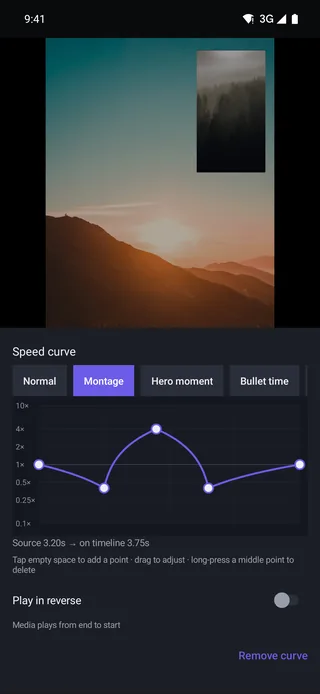
Constant speed, 0.25× to 4×
The simplest case: one number for the whole clip. Pick Normal and drag the flat line, and the clip plays at that speed from first frame to last.
| Speed | A 10-second clip becomes | Reads as |
|---|---|---|
| 0.25× | 40 seconds | Heavy, deliberate slow motion |
| 0.5× | 20 seconds | Classic slow-mo; safe on 60 fps footage |
| 1× | 10 seconds | Recorded speed |
| 2× | 5 seconds | Brisk, still legible |
| 4× | 2.5 seconds | Compression — a walk becomes a transition |
The new duration lands on the timeline as soon as you set it, so a clip that grows pushes the rest of the main track along — the magnetic track keeps everything butted up with no gap to clean up afterwards.
Pitch lock, and when to switch it off
Slowing audio down without correction drops its pitch: voices go boozy, music goes underwater. ProCut turns pitch lock on by default, which keeps the recorded pitch while the timing stretches. A slowed interview stays intelligible; slowed music keeps its key.
Switch it off on purpose in two situations:
- You want the drop — the descending-pitch whoosh under a slow-motion reveal is a real sound design choice.
- You are speeding ambient noise up and the pitch-corrected version sounds artificial; raw and fast is sometimes cleaner.
Reverse: the whole clip, backwards
The Play in reverse toggle sits directly under the curve, captioned media plays from end to start. It reverses picture and audio together, and it stacks with whatever speed you have set — a 0.5× reversed clip plays backwards at half speed.
Reverse earns its keep in three places: undoing an action for comedy (the spill un-spills), hiding a bad ending by finishing where you started, and making a symmetric loop by duplicating a clip and reversing the copy.
Reversing reads every frame of the clip backwards, so it costs more work on long clips than a plain speed change. Split out the two seconds you actually need before reversing.
Freeze frame as a real clip
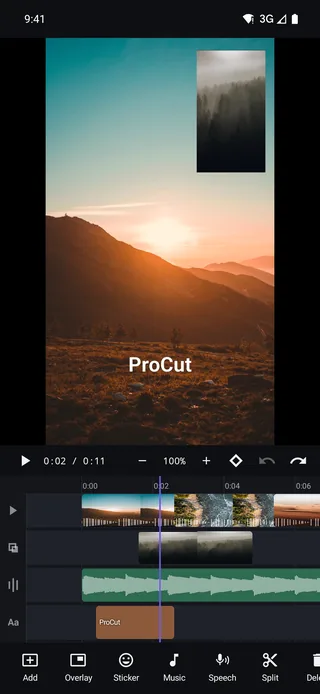
Freeze is in the main toolbar under the timeline — the snowflake. Park the playhead, tap it, and the frame under the playhead becomes a held segment on the timeline.
The word to notice is segment. A ProCut freeze is not a property hidden inside a clip; it is a piece of timeline you can:
- trim, by dragging either edge to change how long the hold lasts;
- put a title over, since the picture is not moving and text is legible;
- animate, with a slow keyframed zoom that keeps the shot alive while it is frozen;
- end with a transition back into motion.
The three-beat freeze
A reliable pattern: freeze on the moment of impact, hold for about half a second, add a title, then cut back to motion. Long enough to register, short enough not to stall the video.
Shoot for slow motion, not against it
Slowing footage down does not create frames that were never recorded. ProCut re-times what you shot, so the source frame rate decides how smooth 0.25× can possibly look.
| Recorded at | Smooth down to | Notes |
|---|---|---|
| 30 fps | ≈ 0.75× | Below that, motion starts to strobe |
| 60 fps | 0.5× | The sweet spot for phone footage |
| 120 fps | 0.25× | Comfortable heavy slow motion |
| 240 fps | 0.125× | Needs a lot of light to stay clean |
High frame rate modes usually need more light — a dim 240 fps clip is a noisy clip.
Constant speed or a curve?
- Constant speed when the whole clip has one job: this take is too long, this action is too fast to read.
- A curve when the clip contains a moment — one instant that deserves slow motion while the approach and the exit do not.
You can always start constant and add a curve later; the curve editor opens on whatever the clip is already doing.
Five mistakes that make slow motion look cheap
Slow motion is the effect people reach for first and misuse most. Nearly every bad example is one of these five.
- Slowing 30 fps footage to 0.25×. There are not enough frames, so motion strobes. The fix is at the camera, not in the edit — shoot 60 or 120 fps when you already know you want slow motion.
- Slowing a shot with nothing moving in it. Slow motion reveals motion. On a locked-off frame it only makes the video longer.
- Starting the slow section on the impact. The eye needs the wind-up to already be slow. Begin two or three frames early and the hit lands.
- Leaving pitch lock off by accident. A voice slowed to 0.5× with no correction is the most recognisable sign of a rushed edit there is.
- Holding it too long. Most slow-motion moments want one to two seconds on screen. Past three, the viewer has finished looking and is waiting.
Stacking the three tools
They compose, and the combinations are more useful than any of them alone.
- Freeze, then reverse. Freeze on the peak of an action, hold, then play the clip backwards out of the freeze. Reads as a rewind, and it is two operations.
- Reverse plus slow. A reversed clip at 0.5× turns an ordinary motion — water pouring, paper falling — into something the eye cannot immediately parse, which is exactly why it holds attention.
- Slow into freeze. Ramp down with a curve, then cut to a freeze at the end of the ramp. Motion decelerates into a stop instead of hitting a wall.
- Duplicate and reverse for a loop. Copy a clip, reverse the copy, butt the two together. It plays out and back with no visible seam — a cheap looping background to put titles over.
Frequently asked questions
Does ProCut add frames to make slow motion smoother?
No. It re-times the frames in your source. For very slow playback, shoot at a higher frame rate — 60, 120 or 240 fps — and slow that down instead.
Does reverse also reverse the audio?
Yes. Play in reverse runs the media from end to start, picture and sound together. Mute the clip if you only want the picture reversed.
Can I freeze a frame and keep the audio running underneath?
Yes. Put your music or voiceover on its own audio lane — freezing a video clip does not touch other lanes, so the sound continues under the held frame.
Slow it down without the chipmunk.
0.25×–4×, reverse, freeze frame and pitch lock — all in the free tier, with no watermark on the export.
Keep reading
Speed curves, ramps and presets
Speed is a curve, not a number. Four presets, draggable control points, and a duration readout that updates as you bend it.
Audio mixing and waveforms
Independent audio lanes, real waveforms, per-clip volume, fades, and the levels that make music and speech coexist.
Split, trim and ripple delete
The four gestures that do 90% of editing, and why ProCut stores cuts as frame numbers instead of approximate seconds.