On the desktop: a real Mac app, and Windows in progress
Phone editors that get ported to the desktop usually arrive as a phone app in a big window — same tap targets, same single-column layout, no keyboard. The Mac build of ProCut is a desktop application. The Windows build is not finished, and this post says so rather than pretending otherwise.
In short
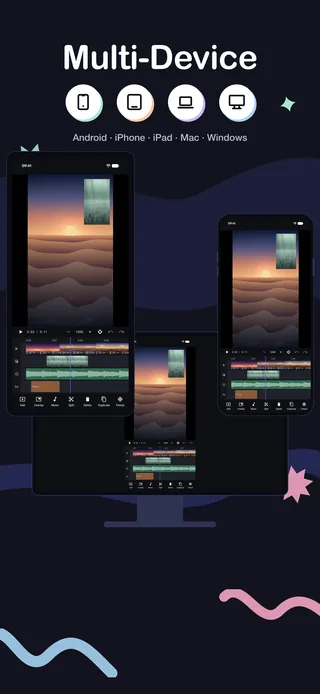
- The Mac app ships today: a Mac Catalyst desktop build, universal for Apple silicon and Intel, macOS 12 Monterey or later.
- It is a 4.3 MB signed and notarised .dmg — direct download, opens without warnings, with a published SHA-256.
- Menu bar, keyboard shortcuts and window resizing — not a phone app in a box.
- Windows is in development. The WinUI 3 and .NET 9 core over Media Foundation already passes the shared golden tests; the interface is not finished, so there is nothing to install yet.
What the Mac build is
| Requires | macOS 12 Monterey or later |
| Architecture | Universal binary — Apple silicon and Intel |
| Distribution | Direct .dmg download; Mac App Store coming |
| Size | 4.3 MB |
| Signing | Developer ID signed and notarised by Apple |
| Version | v1.0.0, with a published SHA-256 |
4.3 MB is not a typo — a native app with no bundled framework is small.
What makes it a desktop app
Mac Catalyst gets a reputation for producing enlarged iPad apps. That happens when a developer ships the iPad layout and stops. This build does the rest of the work:
- A real menu bar, with the file, edit and view menus a Mac user expects to find things in.
- Keyboard shortcuts — which on a timeline is not a nicety. Splitting, playing, stepping a frame and undoing from the keyboard is several times faster than tapping.
- Window resizing, with a layout that uses the extra width rather than centring a phone column in it.
- A pointer, which makes precise trimming genuinely easier: a cursor does not cover the frame you are trying to land on.
Installing it, and verifying it
The .dmg is signed with a Developer ID and notarised by Apple, so it opens normally rather than needing a right-click-open dance or a trip into Security settings. The download page publishes the build's SHA-256 next to the link; if you want to confirm you got the file that was published:
shasum -a 256 ~/Downloads/ProCut.dmgCompare the output with the hash on the download page. That habit is worth having for any app you install outside a store, not just this one.
Where a big screen actually helps
- Timeline width. More seconds visible at a usable zoom means fewer scroll-and-check cycles when you are judging structure.
- Lane depth. Four lanes plus the preview fits comfortably; on a phone you scroll the lane strip.
- Colour judgement. A larger, brighter display is a better place to set grades than a phone at 40% brightness.
- Long projects. Anything past a couple of minutes benefits from keyboard-driven navigation more than from a bigger preview.
The pattern that works best in practice: shoot and rough-cut on the phone where the footage already lives, then move the project to the Mac for trimming, colour and titles.
Windows: the honest status
The Windows app is in development. Specifically:
- It is WinUI 3 and .NET 9 over Media Foundation — a native Windows application, not a wrapper.
- The shared editing core already runs and passes the same golden-frame tests as the mobile apps, so the hard part — matching output across engines — is done.
- The desktop interface around it is not finished, which is why there is nothing to install yet.
- x64 and ARM64 are both planned.
The download page has a notify link rather than a button that pretends. Progress is tracked on the features page.
Feature parity with mobile
The Mac build is the same editor, not a cut-down companion. The multi-track timeline, speed curves, keyframes, colour, audio mixing and 4K export with no watermark are all present, reading the same project format as the phone and tablet apps.
Why keyboard shortcuts change the work
On a phone, every edit is a sequence of taps: select the clip, find the tool, tap it, confirm. On a desktop the same edit is one keystroke, and the difference compounds over a few hundred edits.
It also changes how you edit rather than just how fast. When splitting is a keystroke, you split freely and delete what you do not want. When it costs four taps, you hesitate — and hesitation in an edit shows up as shots held too long.
The same argument applies to playback. Being able to play, stop and step a frame without moving your hand is what makes it practical to watch a cut ten times while you adjust it, which is what a cut actually needs.
What to expect from the Windows build
The unfinished part is the interface, not the engine. Concretely, what already exists and what does not:
| Component | Status |
|---|---|
| Timeline model and project schema | Shared with mobile, complete |
| Media Foundation decode, composite, encode | Running |
| Golden-frame test suite | Passing, same references as Android and Apple |
| WinUI 3 editing interface | In development |
| Installer and store distribution | Not started publicly |
| x64 and ARM64 builds | Planned |
Which is the right order to build in — an interface over an engine that produces different frames from the mobile apps would be worse than no interface at all. The features page tracks progress, and the download page has a notify link rather than a button that does nothing.
Frequently asked questions
Is there a Windows version of ProCut?
Not yet. The WinUI 3 and .NET 9 build over Media Foundation is in development — its editing core passes the same golden-frame tests as the mobile apps, but the desktop interface is unfinished, so there is nothing to install.
Is the Mac app just the iPad app?
No. It is a Mac Catalyst build with a real menu bar, keyboard shortcuts and a resizable desktop layout, distributed as a signed and notarised universal .dmg.
Will macOS warn me about the download?
No. The .dmg is Developer ID signed and notarised by Apple, so it opens without warnings. The download page also publishes a SHA-256 you can verify.
A desktop app, not a big phone.
Menu bar, keyboard shortcuts and a resizable window — 4.3 MB, notarised, free.
Keep reading
One project, every device
Native apps on every platform, one JSON project schema, and golden-frame tests that keep the three engines honest.
Proxy editing and performance
Imports build a 960p proxy for the timeline while export reads your original file — the reason a five-year-old phone can cut 4K footage.
Export presets and 4K HEVC
720p, 1080p, 1080p high, 4K and 4K HEVC — plus a photo export of the current frame, all through your device's hardware codec.