Proxy editing: edit small, export full
Playing 4K video is easy. Playing two 4K streams while blending them, drawing waveforms and responding to a finger drag at 60 frames a second is not. Proxy editing is the standard professional answer, and ProCut does it automatically on import.
In short
- Every import builds a 960p proxy that the timeline and preview use. Your originals are never modified.
- Export reads the original files, so the proxy costs you nothing in final quality.
- Compositing runs on the GPU through each platform's native media stack, not in software.
- Thumbnails and waveforms are generated at the same time, which is why a long clip takes a moment to finish drawing after import.
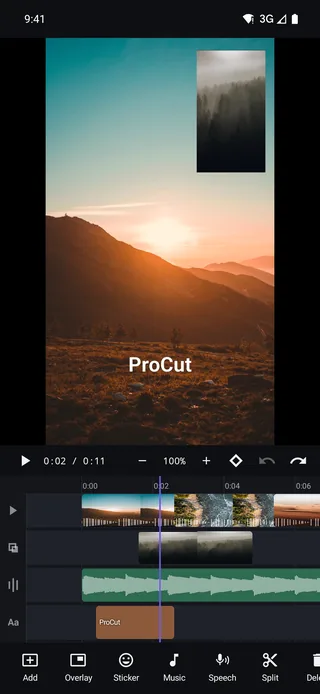
The problem proxies solve
A modern phone shoots 4K at 60 frames per second. Playing that back is a solved problem — the hardware decoder handles it. Editing it is a different workload entirely:
- During a transition, two streams decode at once and blend per pixel.
- A picture-in-picture overlay means two simultaneous streams for its whole duration.
- Scrubbing asks the decoder for arbitrary frames out of order, which is far more expensive than playing forwards.
- Colour, scale and rotation each add a pass over every pixel of every frame.
Stack those and even a flagship phone drops frames. The result is a preview that stutters, and an editor you cannot trust because you cannot see what you are doing.
How ProCut does it
When you import a clip, ProCut generates a 960p proxy — a smaller, lighter copy of the same footage — plus the thumbnail strip and the audio waveform for the timeline. From then on:
| Task | Reads | Why |
|---|---|---|
| Timeline preview | 960p proxy | Enough resolution for a phone screen, a fraction of the work |
| Scrubbing and trimming | 960p proxy | Random-access decoding is where cost explodes |
| Thumbnails and waveforms | Generated at import | Drawn once, reused at every zoom level |
| Export | Original full-resolution file | Final quality comes from your real media |
This is exactly what desktop editors do with 6K and 8K camera footage. The difference is that on a desktop you usually have to set it up; in ProCut it happens on import without a setting to find.
What the proxy does not affect
Worth stating plainly, because "proxy" makes people nervous about quality:
- Your original files are never modified. ProCut does not write to your camera roll.
- Export reads the originals, at whatever resolution you chose.
- Edit decisions are stored as frame numbers, so a cut made against the proxy is the same frame in the full-resolution export.
- Colour and effects are parameters applied at render time, not baked into the proxy.
If the preview looks softer than your footage, that is the proxy doing its job. Export a short section to check real quality rather than judging it from the editing preview.
Native engines, not a shared wrapper
The other half of performance is what ProCut is built on. There is no cross-platform UI framework and no shared rendering layer:
| Platform | Built with | Media pipeline |
|---|---|---|
| Android | Kotlin | media3 / MediaCodec |
| iPhone · iPad · Mac | Swift | AVFoundation |
| Windows | C# · WinUI 3 | Media Foundation |
Three engines, one shared timeline model — checked against the same golden-frame tests so the output matches.
The cost of that decision is three codebases. The benefit is that every platform gets its own hardware decoder, its own GPU compositor and its own encoder, with nothing lost in translation. It is also why the app launches quickly and the binary is small.
Getting the most from modest hardware
- Let imports finish. Proxies, thumbnails and waveforms are being built; starting to scrub immediately is the one moment the timeline is slowest.
- Keep storage free. Proxies need room, and a device close to full slows down everything, not just ProCut.
- Split long recordings. One forty-minute clip is heavier to work with than the three useful minutes you actually need.
- Add effects after the cut. Every graded, scaled or keyframed layer is compositing work on every preview frame.
- Close background apps before a long 4K export — thermal headroom is what keeps the encoder at full speed.
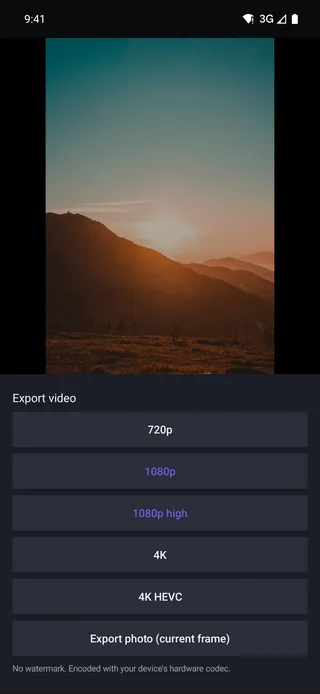
What to expect while editing
- Import: a short processing pass per clip, proportional to its length.
- Scrubbing: immediate, including on stacked lanes.
- Preview with effects: smooth; heavy stacks of layers may soften briefly while the compositor catches up.
- Export: usually a fraction of the project's duration, driven by complexity more than by length.
Battery, heat and long exports
Sustained video encoding is one of the few things that can push a phone into thermal throttling. When that happens the encoder slows down to protect the device, and an export that should take ninety seconds takes four minutes.
What actually helps, in order of effect:
- Take the case off for a long 4K export. Thick cases are insulation, and they are the single biggest controllable factor.
- Plug in — but not into a fast charger. Charging generates its own heat; a slower supply keeps the device cooler while still holding the battery steady.
- Close background apps, particularly anything using the camera, GPS or a video call.
- Do not leave it in the sun. Obvious, and still the reason half of all slow exports happen.
What ProCut writes to disk
| File | Created when | Roughly how big | Removed when |
|---|---|---|---|
| Project (JSON) | You create a project | Kilobytes | You delete the project |
| 960p proxy | You import a clip | A fraction of the source | You delete the project |
| Thumbnail strip | Import | Small | You delete the project |
| Waveform cache | Import | Small | You delete the project |
| Exported video | You export | Depends on preset | You delete it yourself |
Your source media is never modified and never duplicated at full resolution.
If storage is tight, the fastest win is deleting finished projects rather than individual files — that clears the proxy, thumbnails and waveform cache together, and leaves your original footage exactly where it was.
Frequently asked questions
Does proxy editing lower my export quality?
No. The proxy is used only for the timeline and preview. Export reads your original full-resolution files.
Can I edit 4K on an older phone?
Yes — that is precisely what the proxy is for. The timeline works against a 960p copy, so scrubbing stays responsive on modest hardware.
Where are proxies stored, and can I delete them?
They live in the app's own storage alongside the project. Deleting a project removes its proxies; your original media is untouched either way.
4K that scrubs like 1080p.
Automatic 960p proxies, GPU compositing and a native engine on every platform — with full-resolution export.
Keep reading
Export presets and 4K HEVC
720p, 1080p, 1080p high, 4K and 4K HEVC — plus a photo export of the current frame, all through your device's hardware codec.
The multi-track timeline, lane by lane
Video, overlay, audio and text lanes on one ruler — with pinch zoom, magnetic snapping, thumbnail strips and real waveforms.
One project, every device
Native apps on every platform, one JSON project schema, and golden-frame tests that keep the three engines honest.