Templates: a proven structure, then your own edit
Templates get a bad reputation because most apps use them as a wall — pick one, fill the holes, accept whatever comes out. ProCut's are a starting structure that opens into the same timeline as any other project, which means you can take the pacing and throw the rest away.
In short
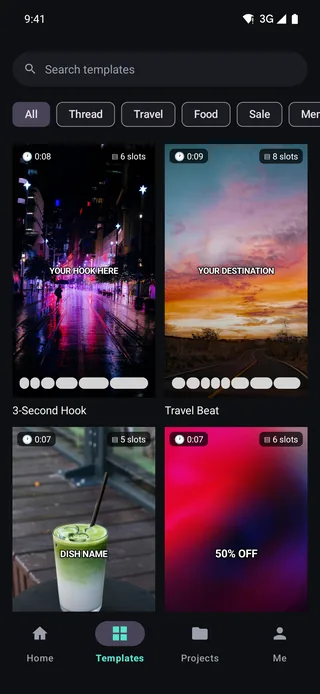
- The Templates tab is one of four bottom tabs, with search and category chips: All, Thread, Travel, Food, Sale, Memories.
- Every card states its duration and slot count up front — 3-Second Hook is 0:08 with 6 slots, Travel Beat is 0:09 with 8.
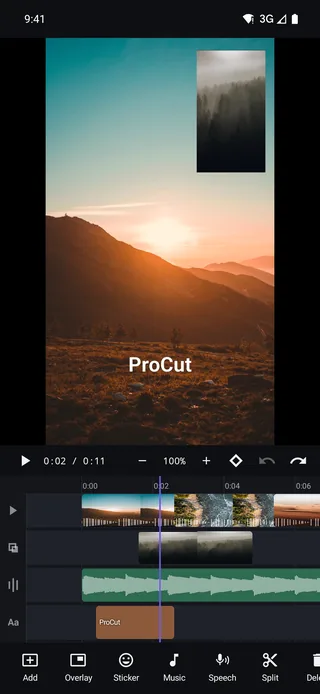
- A template opens as a normal project on the normal timeline; nothing about it is locked.
- Use them for pacing. The value is the rhythm of the cuts, not the graphics.
Finding templates
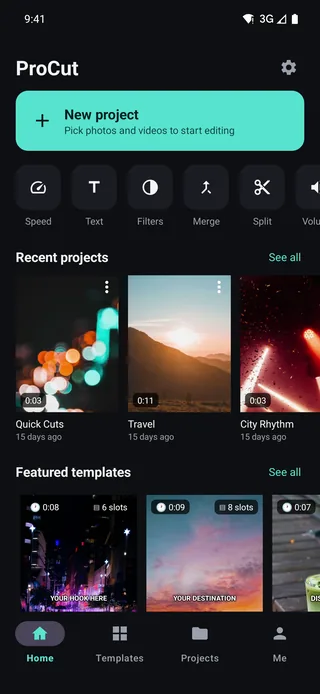
Templates has its own tab in the bottom bar, alongside Home, Projects and Me. Inside there is a search field and a row of category chips — All, Thread, Travel, Food, Sale, Memories — plus a scrolling grid of cards. The Home screen also carries a Featured templates row for the ones worth trying first.
Reading a template card
Each card carries two numbers, and both matter more than the artwork:
| Template | Duration | Slots | What that implies |
|---|---|---|---|
| 3-Second Hook | 0:08 | 6 | Fast cutting — about 1.3s per clip |
| Travel Beat | 0:09 | 8 | Very fast, beat-driven; needs short punchy shots |
| Dish name (food) | 0:07 | 5 | Around 1.4s per clip; room for one hero shot |
| 50% OFF (sale) | 0:07 | 6 | Short, graphic, built around a single message |
Slot count tells you how much footage to have ready before you start.
The slot count is the practical number. Eight slots means eight distinct shots — if you only have four clips, pick a five-slot template rather than repeating footage to fill the gaps.
What the categories are for
- Thread — talking-head and explainer structures for social posts built around a single idea.
- Travel — fast, music-led montage pacing. The eight-slot cadence of Travel Beat is designed for beat-matched cutting.
- Food — a build: ingredients, process, hero shot of the finished dish. Slot order matters more here than in any other category.
- Sale — one offer, one number, one call to action. Short by design.
- Memories — slower, photo-friendly pacing, the natural home for Ken Burns moves.
It opens as a real project
This is the part that separates a starting point from a cage. Once a template is open you are on the standard multi-track timeline with every tool available:
- Re-trim any clip; the template's suggested length is a suggestion.
- Delete slots you do not need, or add clips beyond the template's count.
- Swap the transitions or remove them entirely.
- Replace the music, re-time it, and re-cut to your own track.
- Rewrite every text clip, or throw them all away.
- Change export resolution freely — a template does not lock you to a format.
The most useful thing to steal from a template is its rhythm. Open one, note how long each clip is held and where the cuts land against the music, then rebuild that pacing with your own footage.
Templates as a teaching tool
If you are new to editing, opening a template and taking it apart is faster than any tutorial. Three specific things to look at:
- Clip length. Notice that nothing is held as long as beginners hold shots. Around 1.3 seconds in a 3-Second Hook is not an accident.
- Where the text sits. Every title is inside the safe area, and the hook is on screen almost immediately.
- How few transitions there are. Most joins are straight cuts, even in the energetic templates.
One-tap auto-fill
Honest scope note: filling every slot in one tap by selecting a batch of clips is on the roadmap. In the shipping build you open a template and place your footage into the timeline yourself — which is slower, but is also why nothing about the result is locked down.
Building your own reusable structure
There is no template-authoring tool in the shipping build, but there is a workflow that gets most of the benefit today.
- Build the edit once, properly. Get the pacing, titles, transitions and music where you want them.
- Duplicate the project from the Projects tab before starting the next video.
- Replace the media clip by clip. The timing, the grade, the title styling and the transitions all stay where they were.
- Rewrite the text, keep the layout. Editing a title's content does not disturb its position, size or styling.
For anyone posting on a schedule — a weekly series, a product line, a set of listings — this is the difference between a two-hour edit and a twenty-minute one.
What the slot counts teach about pacing
| Template | Duration | Slots | Average shot length |
|---|---|---|---|
| 3-Second Hook | 0:08 | 6 | ≈ 1.3s |
| Travel Beat | 0:09 | 8 | ≈ 1.1s |
| Dish name (food) | 0:07 | 5 | ≈ 1.4s |
| 50% OFF (sale) | 0:07 | 6 | ≈ 1.2s |
Read down the last column. Every shipping template holds shots for well under two seconds. That is not a stylistic quirk — it is what the format requires, and holding shots two or three times longer is the most common mistake new editors make.
Frequently asked questions
Are templates editable after I open one?
Fully. A template opens as an ordinary project on the ordinary timeline — every clip, transition, title and music track can be changed or deleted.
What does the slot count mean?
How many separate clips the template's structure expects. Travel Beat's 8 slots means eight distinct shots; pick a template whose count matches the footage you actually have.
Do templates put a watermark on my export?
No. ProCut never burns a watermark into an export, whether the project started from a template or from scratch.
Start from a structure that works.
Templates with honest durations and slot counts — then the full timeline, with nothing locked.
Keep reading
The multi-track timeline, lane by lane
Video, overlay, audio and text lanes on one ruler — with pinch zoom, magnetic snapping, thumbnail strips and real waveforms.
Export presets and 4K HEVC
720p, 1080p, 1080p high, 4K and 4K HEVC — plus a photo export of the current frame, all through your device's hardware codec.
Stickers and 3D emoji
Faces, Love, Party, Animals, Food and Nature — dropped onto their own lane, then scaled, rotated and keyframed like anything else.